

Optimizing Your Facebook Business Page Layout for Success
Optimize your Facebook Business Page layout with three simple tweaks. Learn how to adjust cover photos, categories, and apps for better engagement.

Facebook constantly updates its platform, often rolling out new designs that change how users interact with business pages. Whether you are adjusting to a significant update, such as the shift to a single-column timeline, or just doing routine maintenance, it is vital to optimize your Facebook Business Page layout to keep your brand looking professional.
Why is it important to update my Facebook Page layout?
Optimizing your Facebook Business Page layout ensures that your visual branding remains consistent and your key information is easily accessible. Platform updates often shift the placement of profile pictures, categories, and navigation tabs. Regular housekeeping prevents crucial text from being obscured and ensures your most important calls to action, like email signups, remain visible to your visitors.
Adapting to Platform Changes
 We know that Facebook updates can feel relentless. Just when you get your page looking perfect, a new rollout changes the image dimensions or the sidebar location. In our experience, the businesses that succeed are those that adapt quickly rather than ignore change.
When layouts shift, such as the transition to cleaner single-column timelines, it usually benefits the user experience. However, it requires you to perform some housekeeping to ensure your page continues to function as a marketing tool.
Three Tweaks to Make to Your Page
Regardless of the specific version of Facebook we are currently using, three specific elements always require attention during a layout update.
1. Adjust Your Cover and Profile Picture
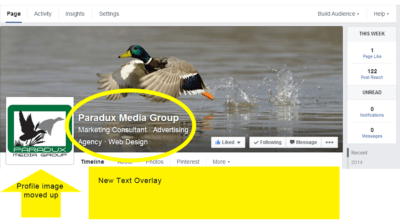 Visual hierarchy is critical. In many layout updates, the profile picture moves higher into the cover photo area, or the business name is overlaid directly on the image.
We recommend checking your cover photo on both desktop and mobile devices. You want to ensure your profile image does not obscure important text or logos on your cover banner. If Facebook overlays your business name on the image, remove it from the image itself to avoid redundancy and clutter.
2. Verify Your Business Category
 Modern layouts often make the “Category” of your business more prominent, placing it directly near your name or in the top information section. This helps with searchability.
Go to your “Update Page Info” settings and ensure your category accurately reflects what you do. This is a minor tweak, but it helps Facebook place you in the right local searches.
3. Prioritize Your Apps and Tabs
Your tabs (or Apps) often move between the top navigation bar and the left sidebar, depending on the current layout. We believe you should not leave this order to chance.
You should arrange your apps so that the most important ones appear first. If building your newsletter list is a goal, your Email Signup app should be in the top three spots. Make it easy for customers to find what matters most to your business.
If you have any questions or need help with your update, you can always schedule a consultation with our team.
Frequently Asked Questions
How often should I change my Facebook cover photo?
We recommend updating it seasonally or whenever you have a significant promotion. It keeps your page looking active and gives you a reason to appear in your followers’ news feeds again.
Does my page category really affect SEO?
Yes. Facebook uses your category to help people find local businesses. Selecting the correct category ensures you appear in relevant searches for your specific services in your area.
Can I remove apps I do not use?
Yes, and you should. Removing unused apps declutters your interface and helps guide visitors to the actions you actually want them to take, like visiting your website or signing up for emails.
Mike Frey is the Chief Visionary Officer and co-founder of Paradux Media Group. With more than 30 years in marketing, advertising, and media, Mike brings a practical perspective shaped by working with hundreds of locally owned businesses. He specializes in media strategy, buying, and storytelling that makes marketing dollars work harder. Mike learned advertising by selling it for a living, and that experience still shapes his approach: understand the business, spend where it matters, and never recommend more than a client actually needs.




What Clients Say
Mike is a wizard! We had Paradux create a video for our company. It got more than 65,000 views on YouTube in the first week….


“Tisha and Garrett have been wonderful to work with. They are very knowledgeable about websites, marketing, SEO. They have both been prompt and efficient in…

We love working with Paradux. They are very professional, always responsive, learn very quickly about a wide variety of businesses and industries, and produce first-class…

“Paradux is top notch – they know their stuff and always take excellent care of me. I get so many compliments on my website! I’ve…

We love working with Tisha and Paradux. They are professional, very responsive, and are able to dive in and learn about a wide variety of…

I loved working with Paradux on updating our website to look more modern! They are very responsive and incredibly fast at getting things done. I’m…

“Paradux worked quickly and efficiently to quickly get an ad campaign together for our biggest annual fundraising event. I will be using them every year…

“I loved working with Paradux on updating our website to look more modern! They are very responsive and incredibly fast at getting things done. I’m…

“The team at Paradux was wonderful to work with. Their expertise, assistance, grace, and personality were such a joy in our partnership on a video…
